The right message at the right time, without typing it
Reminders the day before, done notices, receipts, failed-card links and welcome messages go out on their own, from a texting number registered to your business. Change any wording, switch off what you don’t use, and answer replies from one inbox.
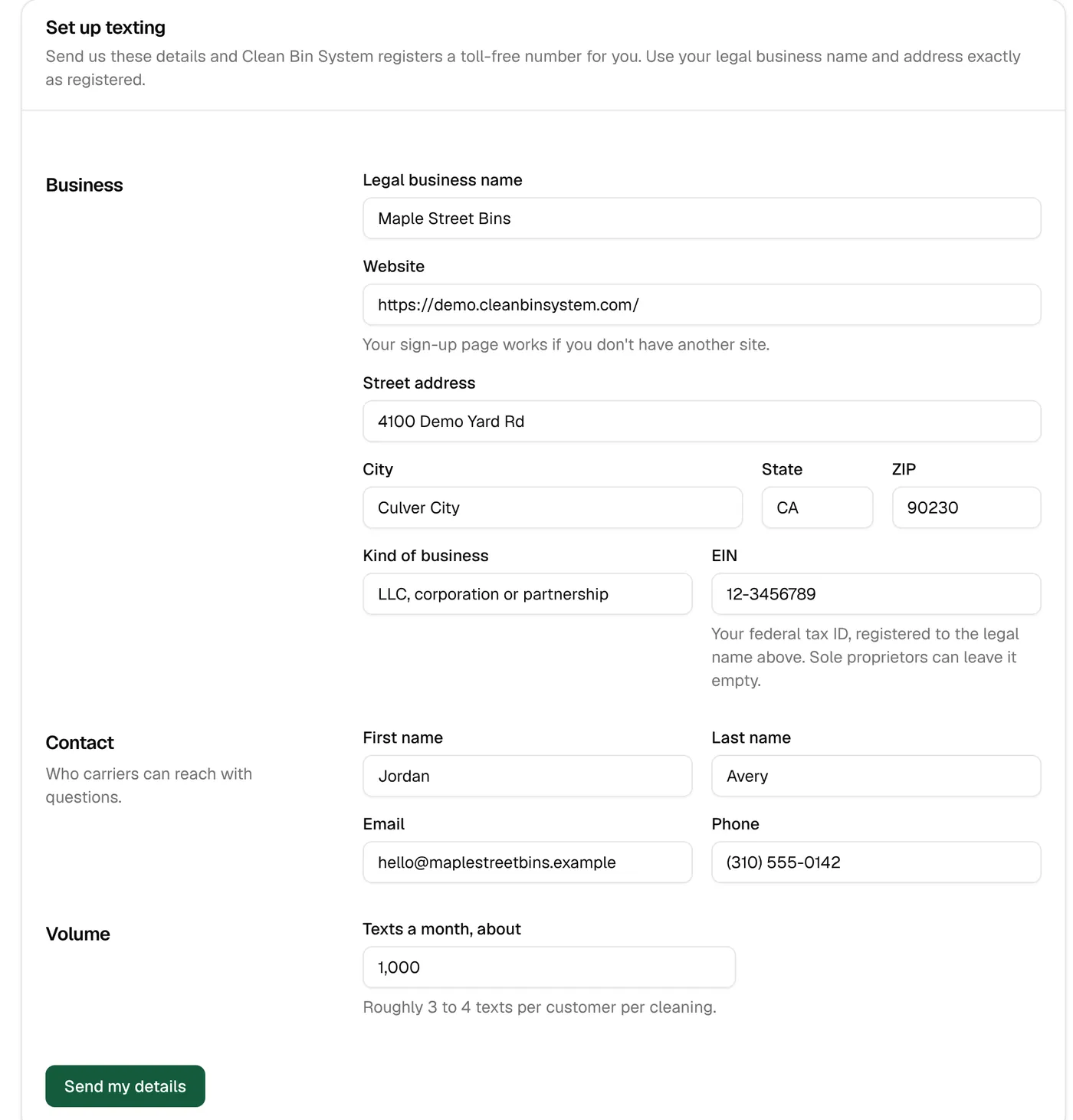
A texting number registered to your business
Fill in one form with your business details, and the system gets you a toll-free number and sends it to the carriers for approval. Until it’s approved, texts are saved instead of sent, so nothing goes out half-ready.
- The number and carrier paperwork handled from one form
- Your EIN for companies, or nothing extra for sole proprietors
- Approval takes a few business days, sometimes up to two weeks
- Replies forwarded to your phone and your email
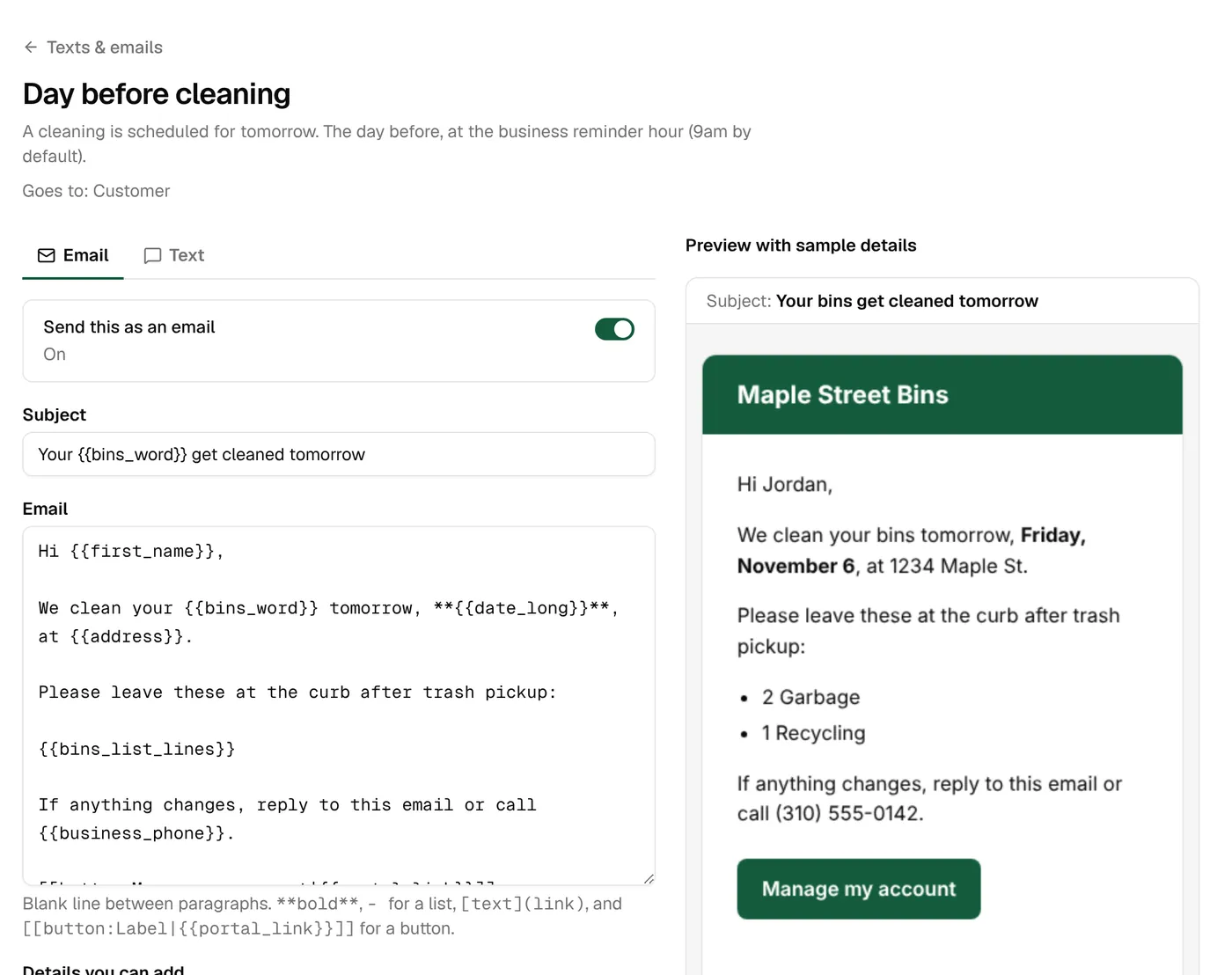
Every message, in your words
Every text and email the system sends is listed with when it goes out and who gets it. Change the wording with fill-in fields like the customer’s name and date, see a live preview with the text’s length, and send yourself a test.
- Fill-in fields for names, dates, bins and links
- A live preview with the number of text segments
- Send a test to yourself before you save
- Switch off the ones you don’t want; reset to the original any time
Consent and quiet hours, handled
Customers opt in to texts when they sign up, in wording carriers accept, and get a confirmation text. STOP, START and HELP replies work on their own. Texts wait out your quiet hours and go in the morning.
- Quiet hours from 9 pm to 8 am to start, for texts
- Offers and review asks only to people who opted in to offers
- Offers carry “Reply STOP”; their emails carry an unsubscribe link
- Up to 5 extra contacts per customer, each with their own text and email switches
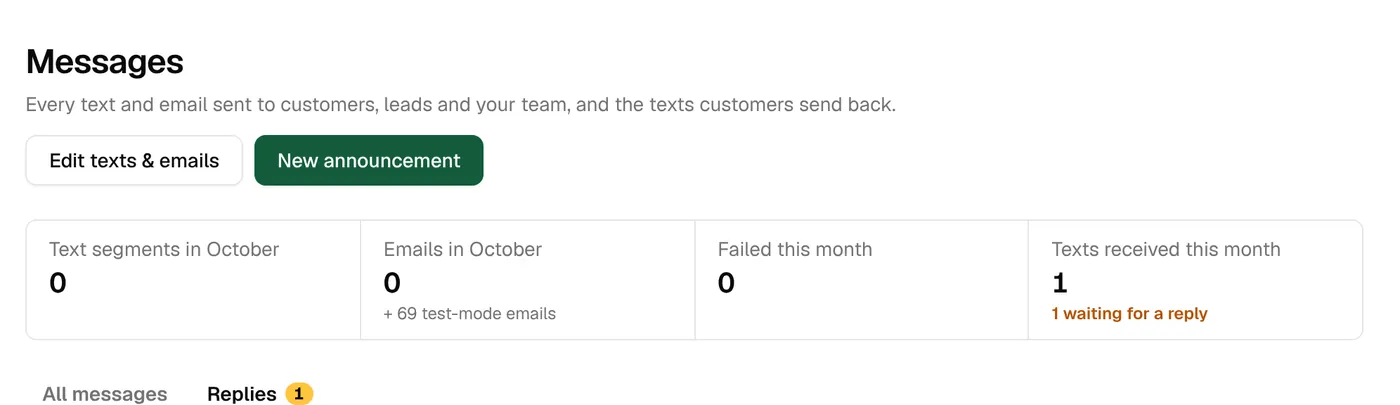
Two-way texting
When customers reply, it lands in your inbox with a count of who’s waiting. Answer from the office and the conversation stays with the customer’s record. Every message is logged with its delivery status.
- Replies inbox with a waiting count
- Forwarded to your phone and email
- Delivery receipts and “send again” for failed messages
Announcements to the right people
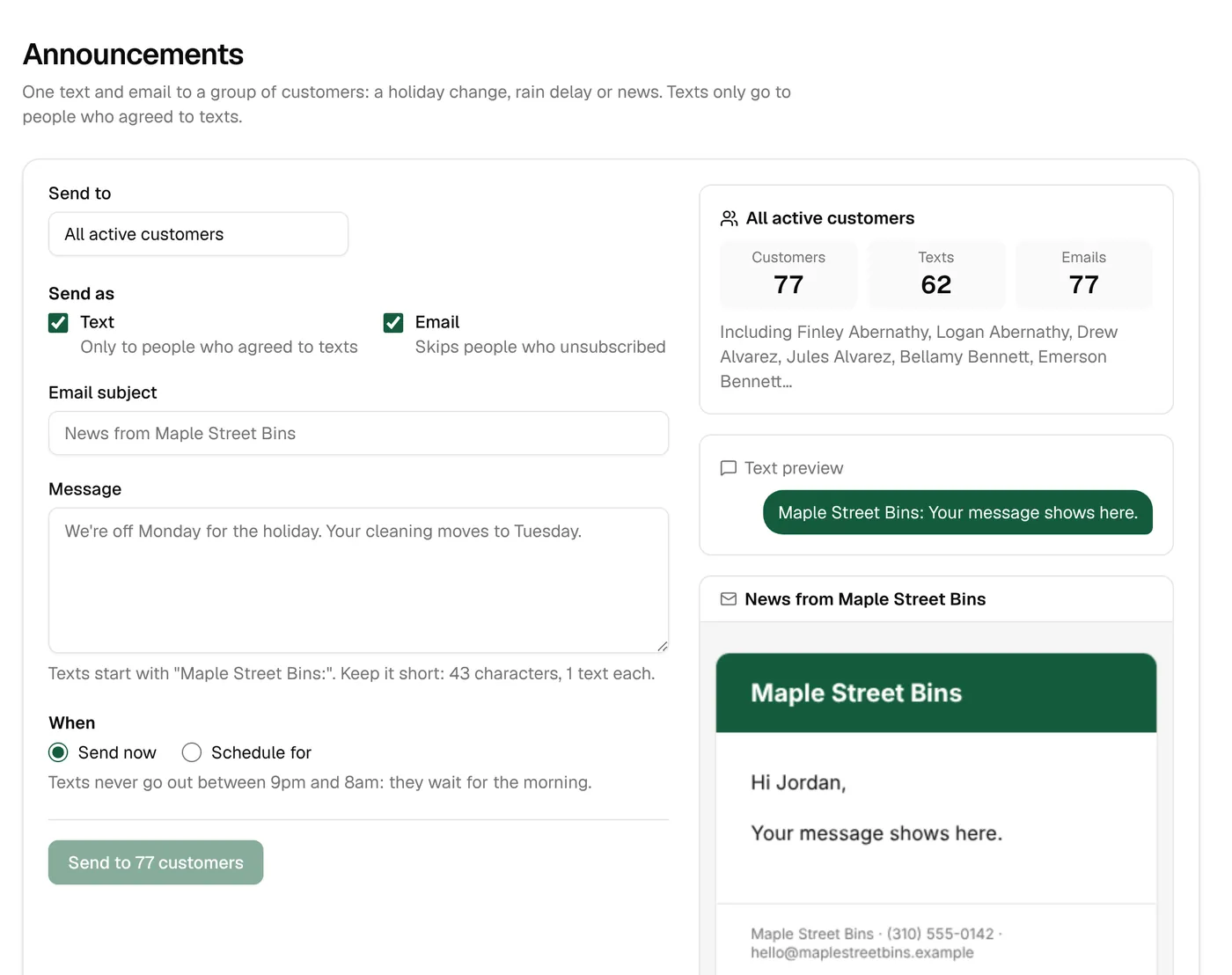
Tell one zone about a weather delay, everyone on Tuesday’s route about a schedule change, or one plan about a new add-on. Send now or schedule it, by text, email or both.
- Everyone, a zone, a cleaning date, a plan, a route group or a tag
- See how many people it will reach before you send
- Send now or at a time you pick, and cancel before it goes
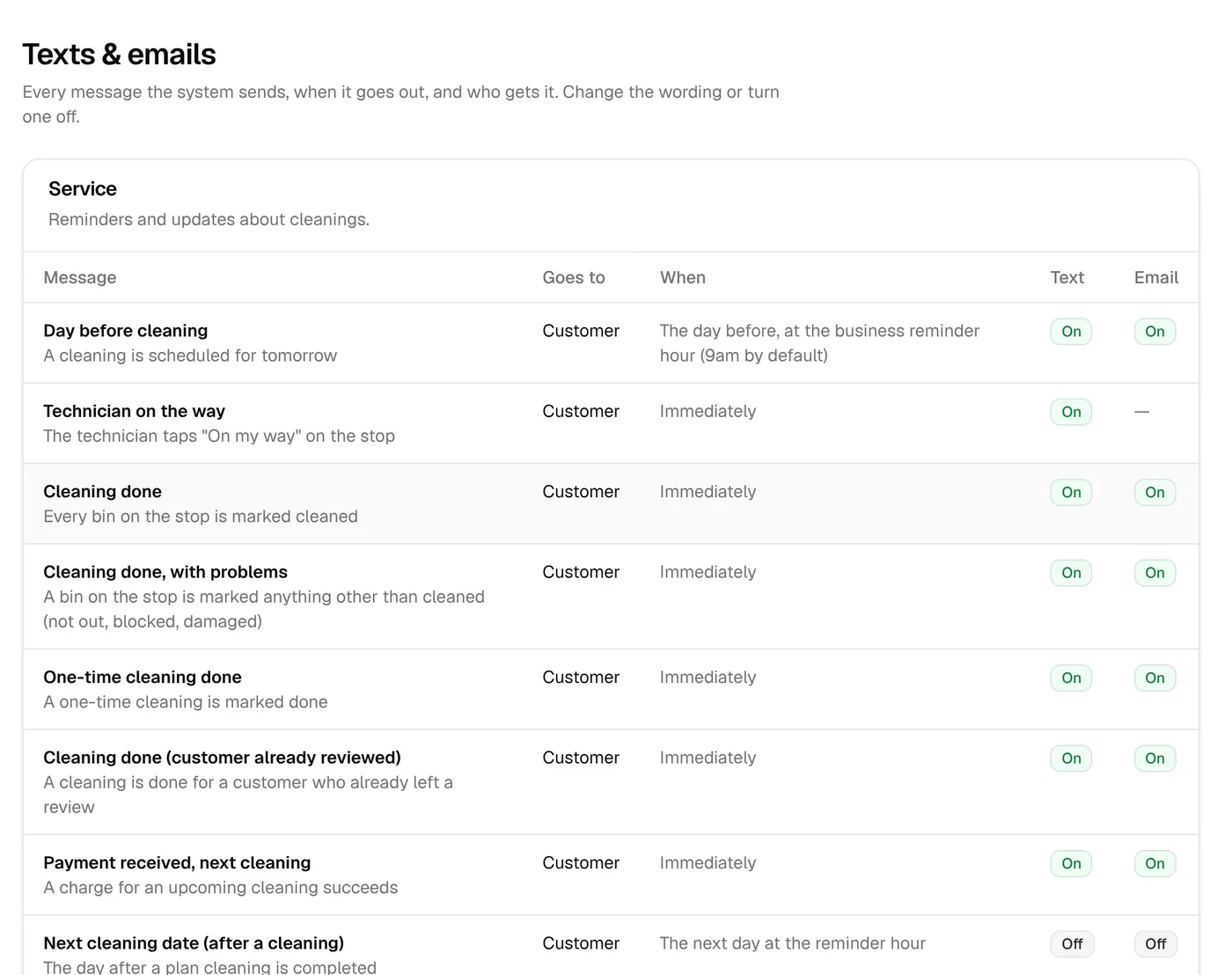
The full list
Every message the system sends.
59 messages: 36 with a text and 52 with an email. 14 are always on, like failed-card notices and sign-in links; you can still change their wording. The rest you can switch off.
Service18
| Message | When it goes out | To | Sent as |
|---|---|---|---|
| Day before cleaning | The day before, at the business reminder hour (9am by default) | Customer | Text and Email |
| Technician on the way | Immediately | Customer | Text |
| Cleaning done | Immediately | Customer | Text and Email |
| Cleaning done, with problems | Immediately | Customer | Text and Email |
| One-time cleaning done | Immediately | Customer | Text and Email |
| Payment received, next cleaning | Immediately | Customer | Text and Email |
| Next cleaning date (after a cleaning)Off until you turn it on | The next day at the reminder hour | Customer | Text and Email |
| Cleaning rescheduled | Immediately | Customer | Text and Email |
| Service booked | Immediately | Customer | Text and Email |
| Day before a service | The day before, at the reminder hour | Customer | Text and Email |
| Service rescheduled | Immediately | Customer | Text and Email |
| Technician on the way (service) | Immediately | Customer | Text |
| Service done | Immediately | Customer | Text and Email |
| Estimate visit booked | Immediately | Customer | Text and Email |
| Estimate visit done | Immediately | Customer | |
| Quote request received | Immediately | Customer | |
| Proposal sent | Immediately, then 2, 7 and 14 days later until answered | Customer | Text and Email |
| Message from the officeAlways on | When you send it | Customer | Text and Email |
Billing13
| Message | When it goes out | To | Sent as |
|---|---|---|---|
| Invoice sent | Immediately | Customer | Text and Email |
| Invoice still unpaid | 1, 2, 4, 7 and 14 days after it was sent | Customer | Text and Email |
| Payment receipt | Immediately | Customer | |
| Card charge failedAlways on | Immediately, then on the dunning days (1, 2, 4, 7, 10, 15 and 20 days by default), restarting monthly until paid | Customer | Text and Email |
| Card expiring | Once, at the start of the month it expires | Customer | Text and Email |
| Prepaid cleanings used up | Right away (usually a few weeks before that cleaning) | Customer | Text and Email |
| Account on holdAlways on | Immediately | Customer | Text and Email |
| Booked with pay later | Immediately | Customer | Text |
| Price change notice | The set number of days before the new price starts | Customer | |
| Cancellation confirmedAlways on | Immediately | Customer | Text and Email |
| Tip received | Immediately | Technician | |
| Unfinished sign-up (first nudge) | 20 minutes after they stop | Lead | Text and Email |
| Unfinished sign-up (follow-ups) | 24 and 72 hours later | Lead | Text and Email |
Account8
| Message | When it goes out | To | Sent as |
|---|---|---|---|
| Welcome text | Immediately | Customer | Text |
| Welcome emailAlways on | Immediately | Customer | |
| Text opt-in confirmationAlways on | Immediately | Customer | Text |
| Welcome for moved-over customers | When you click Activate on the import | Customer | |
| Moved-over customers: add a card | When you click Activate on the import | Customer | Text and Email |
| Login linkAlways on | Immediately | Customer | Text and Email |
| Password resetAlways on | Immediately | Customer | |
| Team inviteAlways on | Immediately | Technician | Text and Email |
Marketing10
| Message | When it goes out | To | Sent as |
|---|---|---|---|
| One-time win-backOnly with offers opt-in | 75 days after their cleaning (set in Settings) | Customer | Text and Email |
| Referral credit earned | Immediately | Customer | |
| Review ask: same eveningOnly with offers opt-in | 8pm on the day of the cleaning | Customer | Text |
| Review ask: 3 days laterOff until you turn it onOnly with offers opt-in | 72 hours after the cleaning | Customer | Text |
| Review ask: 5 days laterOff until you turn it onOnly with offers opt-in | 120 hours after the cleaning | Customer | |
| Gift card for the recipientAlways on | On the send date chosen by the buyer | Gift card recipient | |
| Gift card receipt for the buyerAlways on | Immediately | Gift card recipient | |
| Gift card used | Immediately | Gift card recipient | |
| Now serving your area | When you send it from Leads | Lead | Text and Email |
| Message blastAlways on | When you send it | Customer | Text and Email |
To your team10
| Message | When it goes out | To | Sent as |
|---|---|---|---|
| New customer (to you) | Immediately | Your team | |
| Cancellation (to you) | Immediately | Your team | |
| Quote request (to you) | Immediately | Your team | |
| Proposal answered (to you) | Immediately | Your team | |
| Deposit paid (to you) | Immediately | Your team | |
| Disputed payment (to you)Always on | Immediately | Your team | |
| Dispute decided (to you) | Immediately | Your team | |
| Stops left open (to you)Always on | Each morning with the daily run | Your team | |
| Out-of-area request (to you)Off until you turn it on | Immediately | Your team | |
| Daily summary (to you) | With the daily run | Your team |
Texts & emails
The details
- Texting number
- Toll-free, registered to your business
- Reminders
- The day before, at 9 am to start
- Quiet hours
- 9 pm to 8 am to start (texts)
- Consent
- Opt-in at sign-up; STOP, START and HELP handled
- Emails
- Sent with your business name and logo; replies go to you
- Extra contacts
- Up to 5 per customer
- Announcements
- By zone, date, plan, route group or tag; now or scheduled
Texts are counted by segment. A short text is one; a long one can be two or three. Each plan includes a number every month.
Keep exploring
Try it with your own prices and routes.
3 days free with every feature, and nothing is charged until the trial ends. Everything begins in test mode, so nothing reaches your customers until you’re ready.