Lesson 13 of 146 min read
Your numbers: the dashboard and reports
What the Clean Bin System dashboard shows each morning, 12 months of reports on money, customers, cleanings and texts, and which numbers to check when.
Most of what goes wrong in a bin cleaning business is small. A stop nobody closed out. A card that failed. A street where the bins are never out. Each one is easy to fix the week it happens, and easy to miss if nobody looks.
The dashboard shows what needs you today. Business › Reports shows the last 12 months, month by month. Neither page changes anything. They only show your numbers.
The dashboard
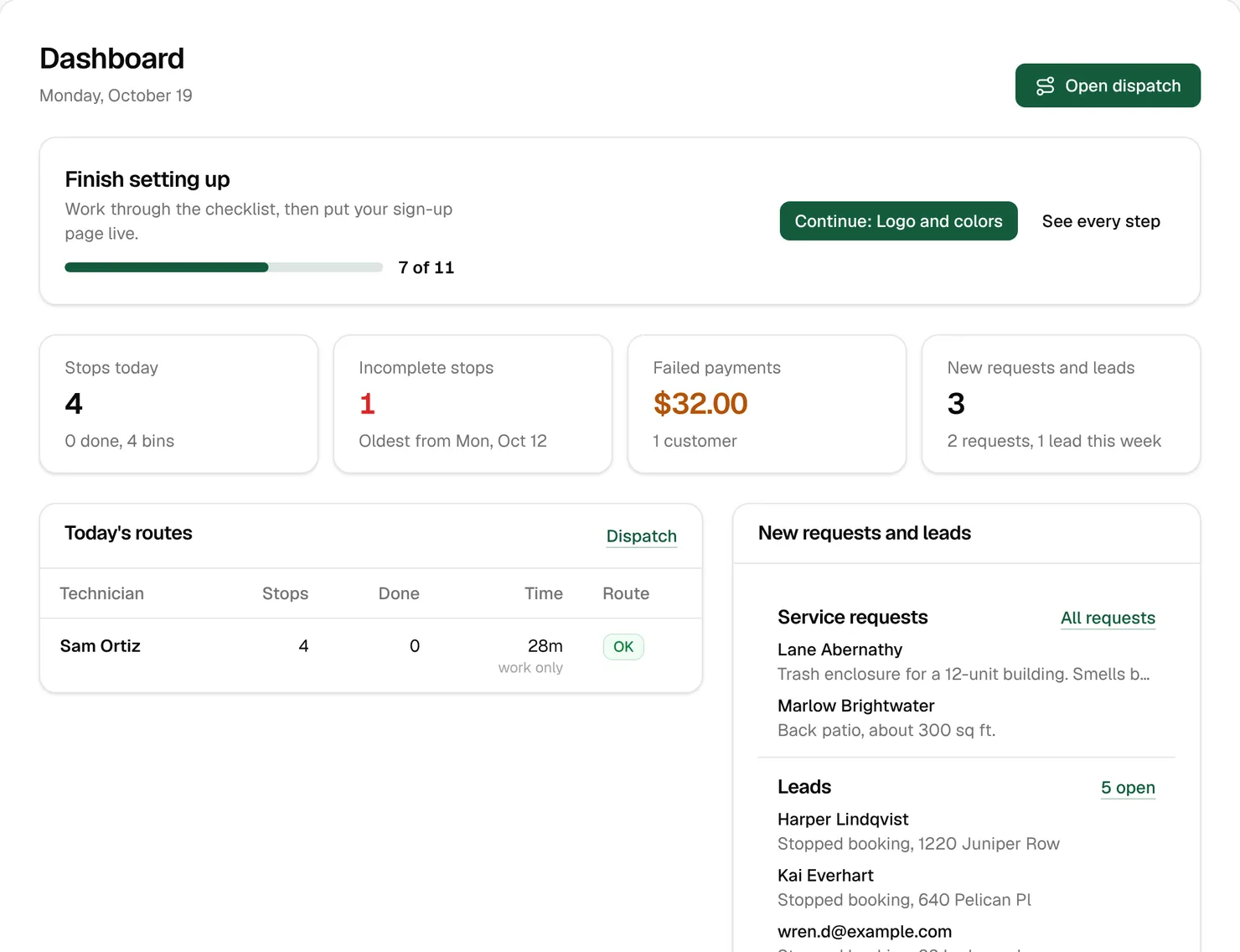
The dashboard is the first page of the back office. Until you go live, Finish setting up sits at the top with your progress through the checklist and the next steps (Lesson 2). Below it are four cards. Click any card to open the page behind it.
| Card | What it counts | What to do |
|---|---|---|
| Stops today | Today’s stops and bins, and how many are done | Open today in Dispatch |
| Incomplete stops | Stops from before today that nobody closed out. Red above 0 | Close out each one in Dispatch (Lesson 8) |
| Failed payments | Failed card charges still owed, plus overdue invoices | Open the unpaid list (Lesson 7) |
| New requests and leads | New service requests, plus leads from the last 7 days | Quote the requests, call the leads (Lesson 12) |
Further down:
- Today’s routes: one row per technician, with stops, how many are done, the estimated time and a badge, OK, Getting full or Full. “work only” under the time means the route isn’t optimized yet, so driving isn’t counted.
- New requests and leads: the latest three of each, with links to the rest.
- October 2026 so far, named for the current month: money collected after refunds, compared with the same days last month; new customers against cancellations, in red when you lost more than you gained; the top reasons people canceled; and how many customers are on each plan.
- Next 30 days: what the scheduled cleanings will charge, what’s already paid, and Route capacity, the busiest route on each working day against your Getting full and Full lines.
A five-minute morning
- Incomplete stops above 0? Close them out first. An open stop is a customer you can’t say was cleaned. Clean Bin System also emails you about yesterday’s open stops every morning.
- Failed payments? The customer is already getting texts and emails with a link to update their card. Call the ones that are weeks late.
- New requests and leads? Quote the requests and call the leads who got furthest.
- Today’s routes: anything Full or not assigned? Fix it before the trucks leave.
If you’re on the truck early, the Daily summary (to you) email has today’s stops, what was charged overnight, failed charges and yesterday’s new customers. It arrives with the daily run, 5 am unless you change it.
Watch out: Failed payments also counts overdue invoices, so it can be more than your failed card charges.
Reports: the last 12 months
Open Business › Reports. There are no date pickers: every report covers the last 12 months, except Cleanings per technician and Cleanings per zone, which cover 6. The current month is drawn lighter, because it isn’t over. Each report has a Download CSV button for your bookkeeper or your own spreadsheet.
Money
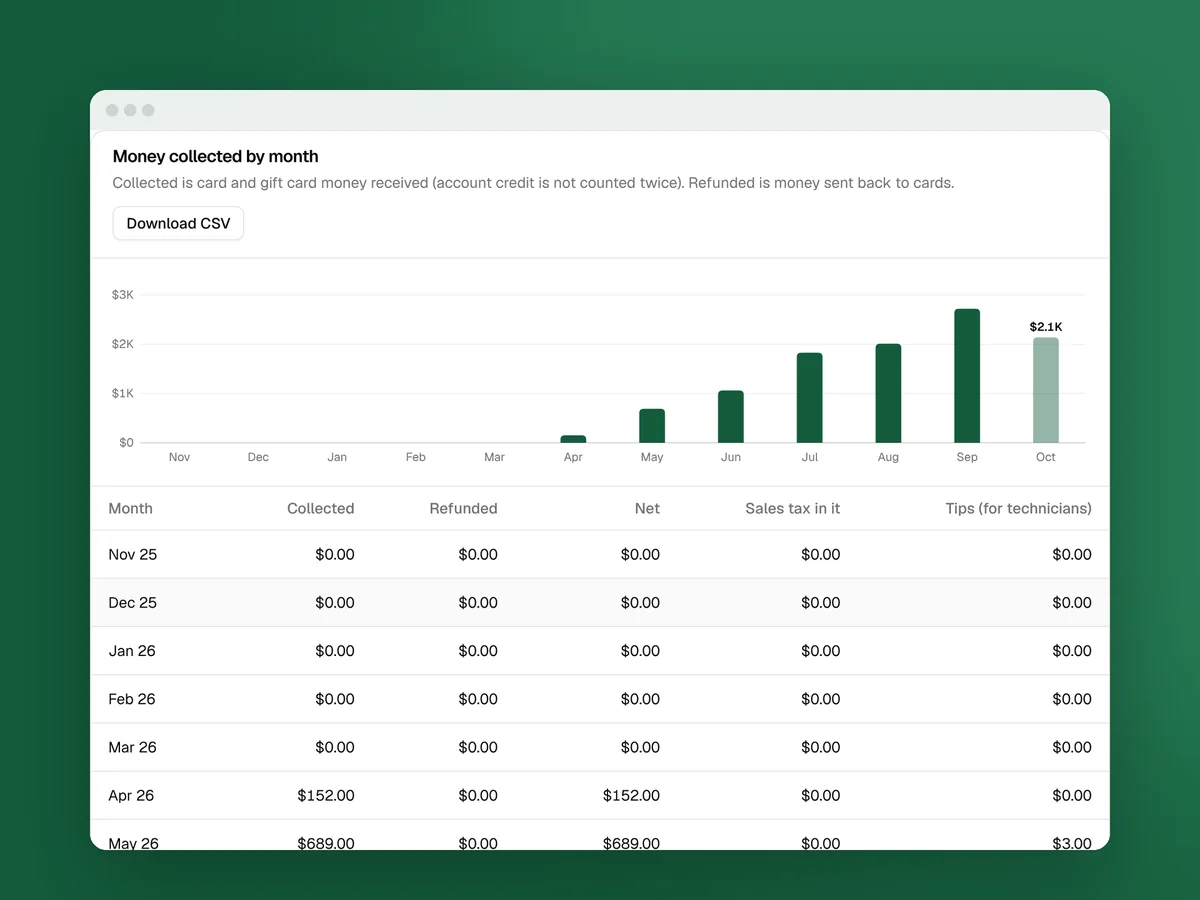
Money collected by month shows what came in, what went back to cards, the Net, the Sales tax in it and Tips (for technicians). Average revenue per customer divides the money by the customers who paid, and by your plans. Prepaid cleanings sold shows the cash you took up front.
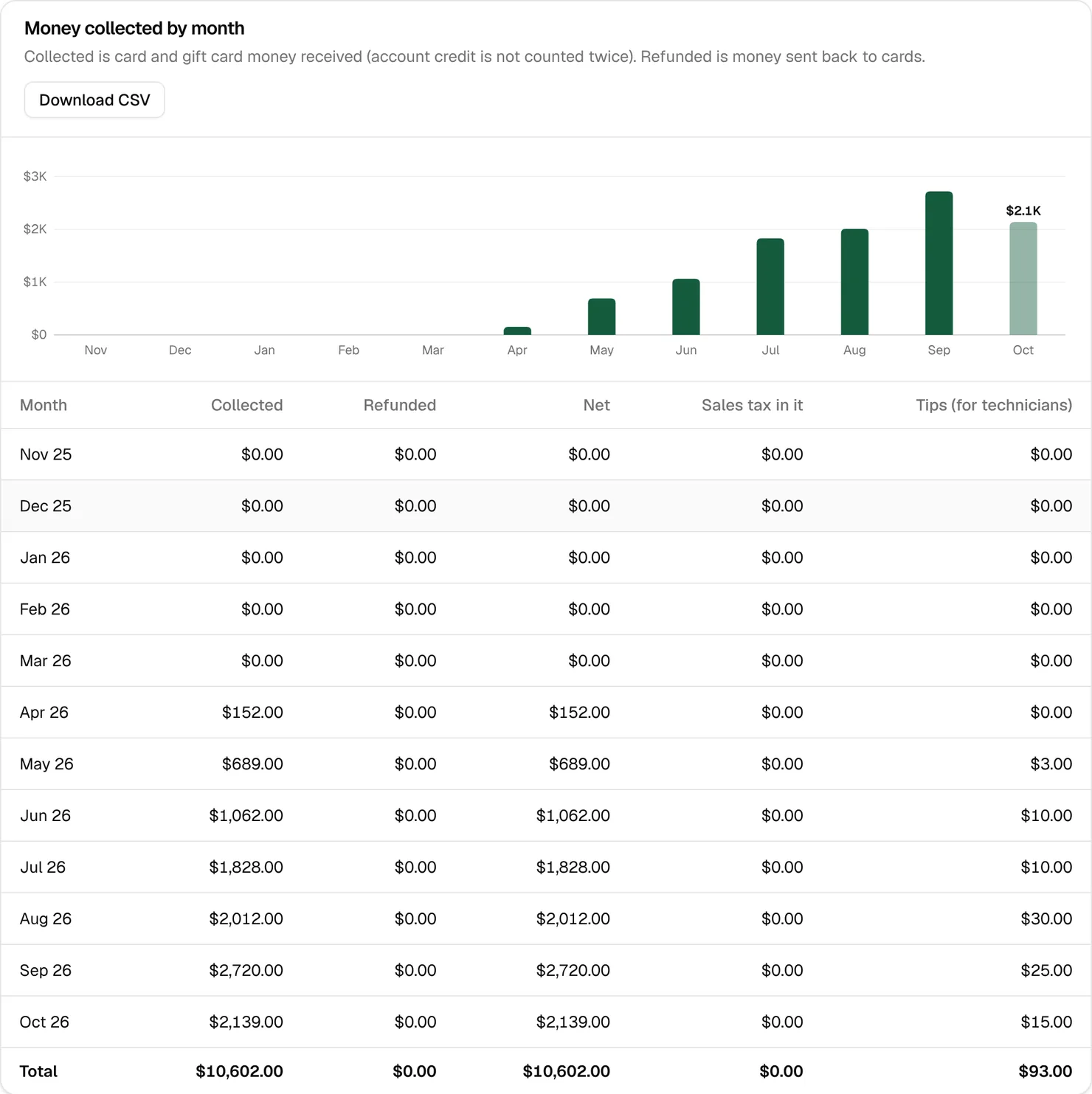
Tip: Download the Money collected by month CSV for your bookkeeper. Sales tax and technicians’ tips have their own columns, so they’re easy to set aside.
Customers
Customers over time shows plans at month end, new plans, cancellations and Churn: the month’s cancellations divided by the plans you had at its start. It counts recurring plans only. Churn decides what a customer is worth. In the startup course’s numbers, losing 3% of customers a month keeps 69% of them for a year, and losing 5% keeps 54% (money lesson).
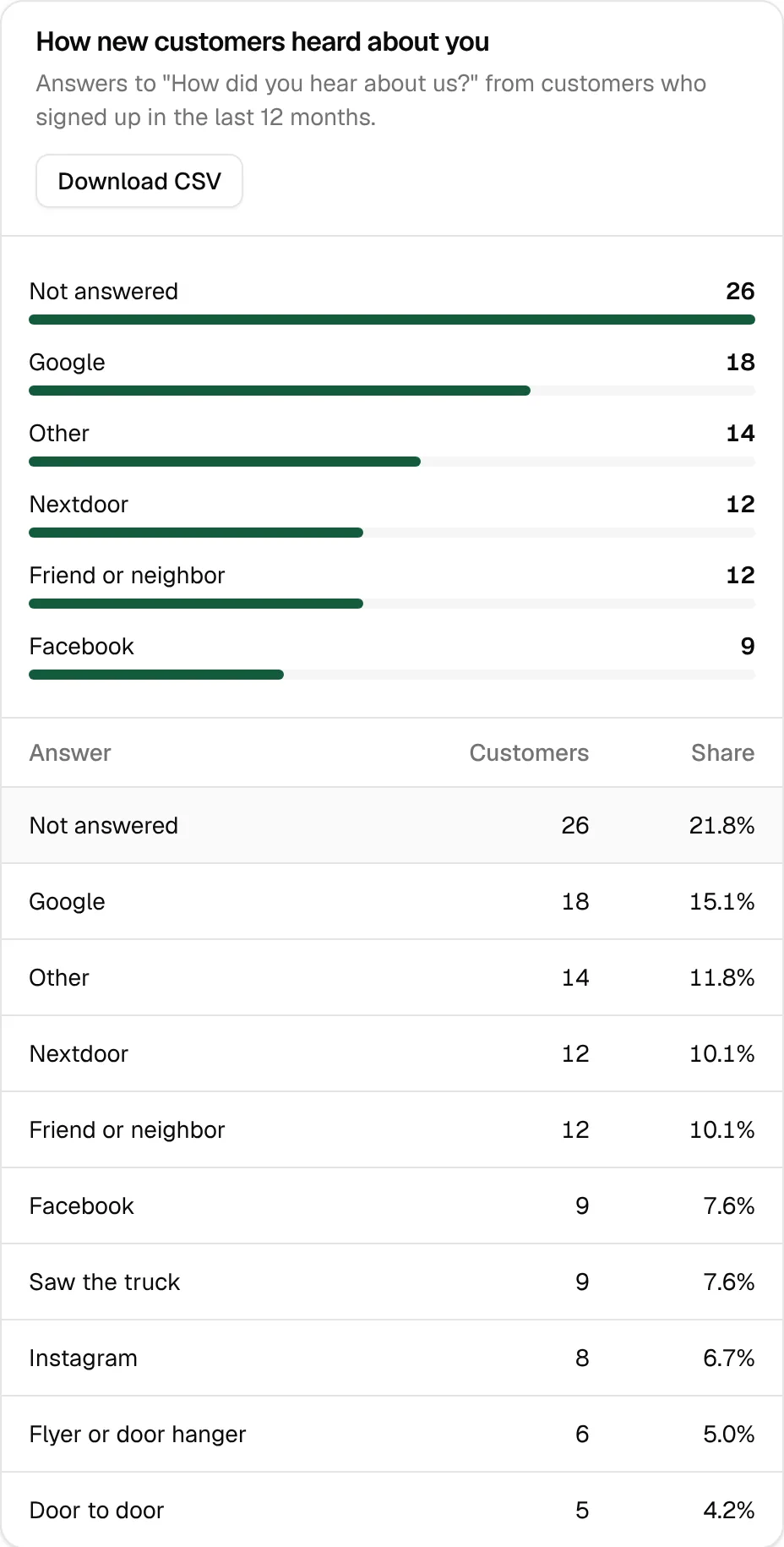
How new customers heard about you shows every answer to “How did you hear about us?” from the last 12 months, with blanks counted as “Not answered”.
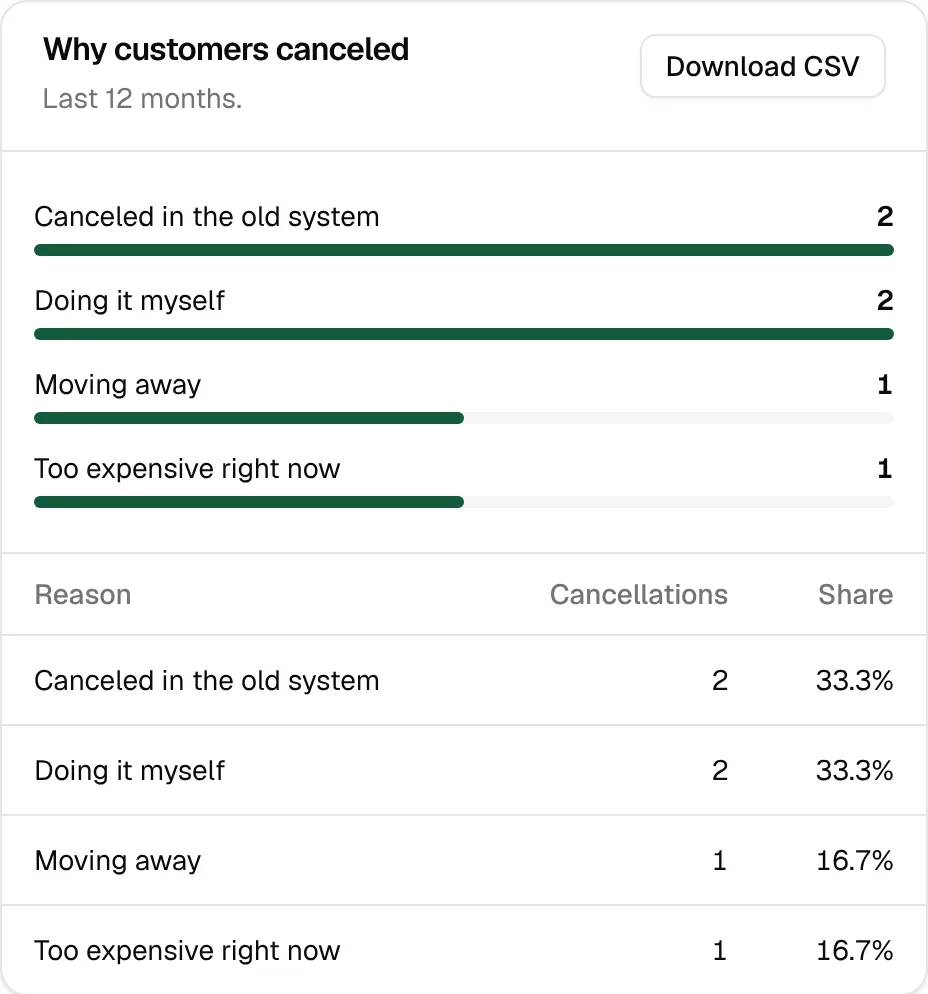
Why customers canceled shows the top reasons. If one keeps coming up, that’s your next thing to fix. Someone who says it’s too expensive right now might stay on a plan that cleans less often.
Online sign-ups by ad and link tracking shows which ads, links and QR codes brought sign-ups, and how many of those customers are still on a plan. Watch that last column. An ad whose customers cancel in a month is worse than it looks.
Cleanings
Missed and partial cleanings shows, month by month, the stops done, partly done (some bins not out or not cleaned), not done, and never closed out.
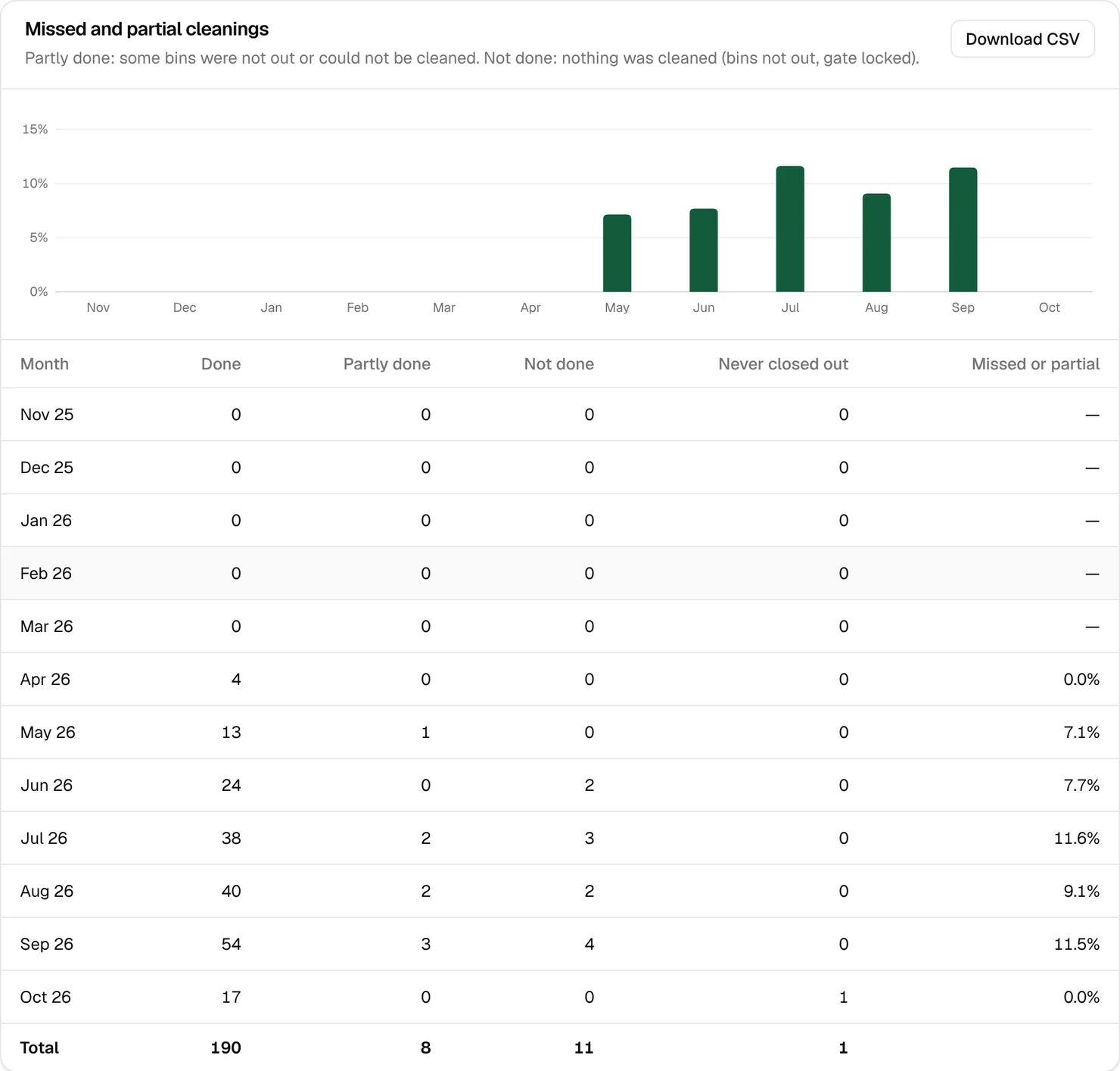
In the sample business, more than 1 stop in 10 in July and September had a bin that wasn’t cleaned. The startup course has no benchmark for this and says to watch your own trend (hiring lesson). When it climbs, check the day-before reminder is going out (Lesson 11) and read the notes on the missed stops.
Cleanings per technician and Cleanings per zone count the stops done or partly done in each of the last 6 months.
Texts and emails
Texts and emails sent counts texts, text segments and emails each month, with an estimated cost. Texts saved in test mode are counted too, so you can see what they would have cost. Your plan page shows only the texts that count toward your plan (Lesson 14).
What to look at, and when
| When | Where | What to look for |
|---|---|---|
| Every morning | The dashboard | Open stops, failed cards, new leads, a full route |
| Every week | Missed and partial cleanings, Customers › Leads | More bins not out, leads nobody called |
| Every month | Customers over time, Why customers canceled, Money collected by month | Churn going up, a reason that keeps coming back |
| After a campaign | Online sign-ups by ad and link tracking | Which ad, hanger or code paid for itself |
| At tax time | Download CSV on the money reports | Collected, refunded, sales tax and tips by month |
On the 1st of each month, owners also get an email with last month’s customers, cleanings and money, and a button to open Reports.
Key takeaways
- The dashboard shows what needs you today. Nothing on it changes anything.
- Close out incomplete stops every day, and check failed payments and new leads every morning.
- Reports cover the last 12 months, month by month, with a CSV for each.
- Watch churn, missed cleanings and where customers came from. Each one points at something to fix.
- The current month is drawn lighter because it isn’t over yet.
FAQ
Can I pick a date range in Reports?
No. Every report shows the last 12 months, or the last 6 for the per technician and per zone reports. Download the CSV to work with the numbers yourself.
Why is Failed payments more than my failed card charges?
It also counts the unpaid balance of overdue invoices.
What does “work only” mean under a route’s time?
The route hasn’t been optimized yet, so the estimate counts only the time at each stop, not the driving.
What does “Never closed out” mean?
Stops nobody marked done, partly done or not done, so they’re still incomplete. Close them out in Dispatch.
Why does this month look so low?
It isn’t over yet. The current month is drawn lighter and marked “(so far)”.