Lesson 4 of 147 min read
Zones, trash haulers and holidays
How to draw your service area in Clean Bin System, put customers on their trash day in a four-week cycle, and move cleanings with hauler holidays.
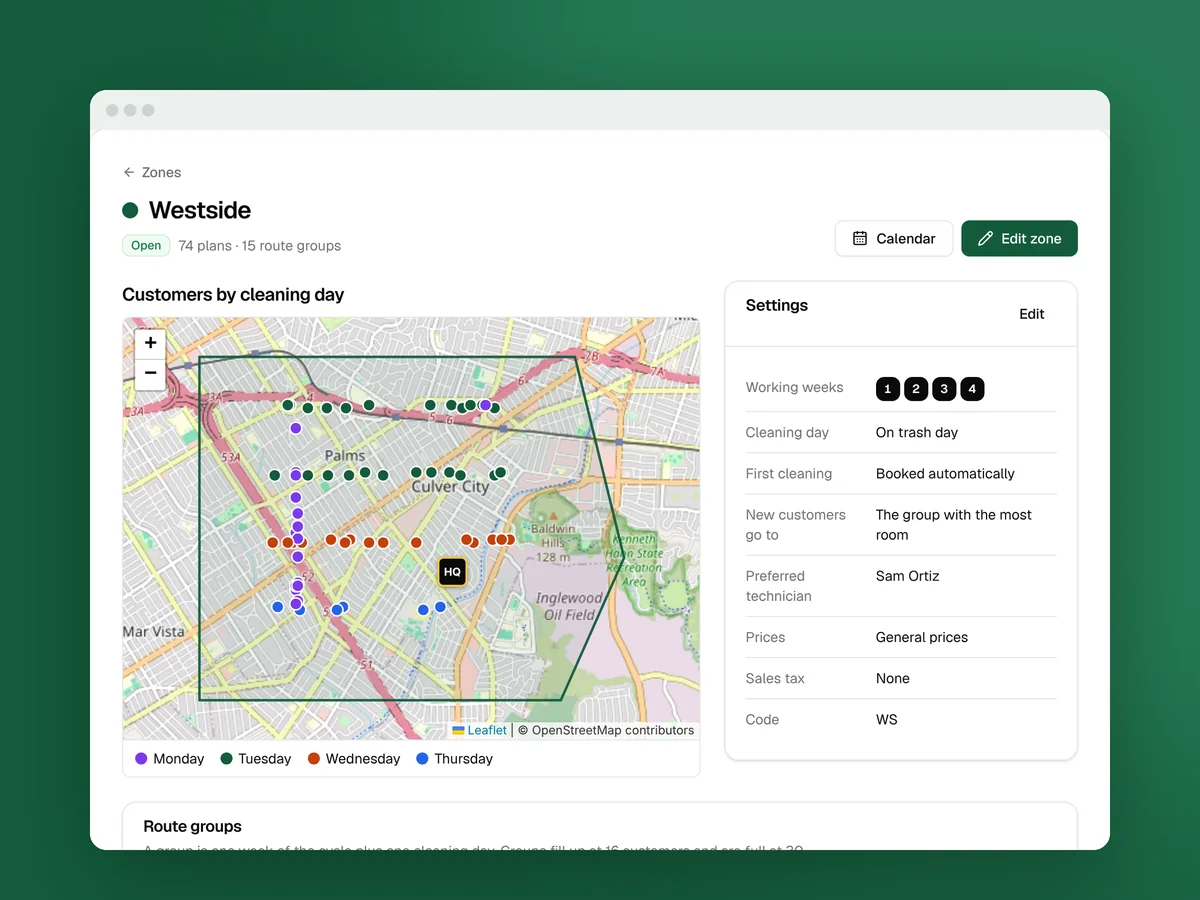
A zone is an area you serve, drawn on a map. Each zone decides three things: who can book, when they’re cleaned, and what new customers pay. The sign-up page checks every address against your zones. Outside all of them, people join your waitlist instead.
Zones matter because a bin cleaning day only pays when the stops are close together. In the startup course’s income model, the same trailer brings in about $1,480 a day with stops two minutes apart and about $490 with stops twenty minutes apart (routes lesson). A zone is how you turn down the far-off stop before it books.
Draw your first zone
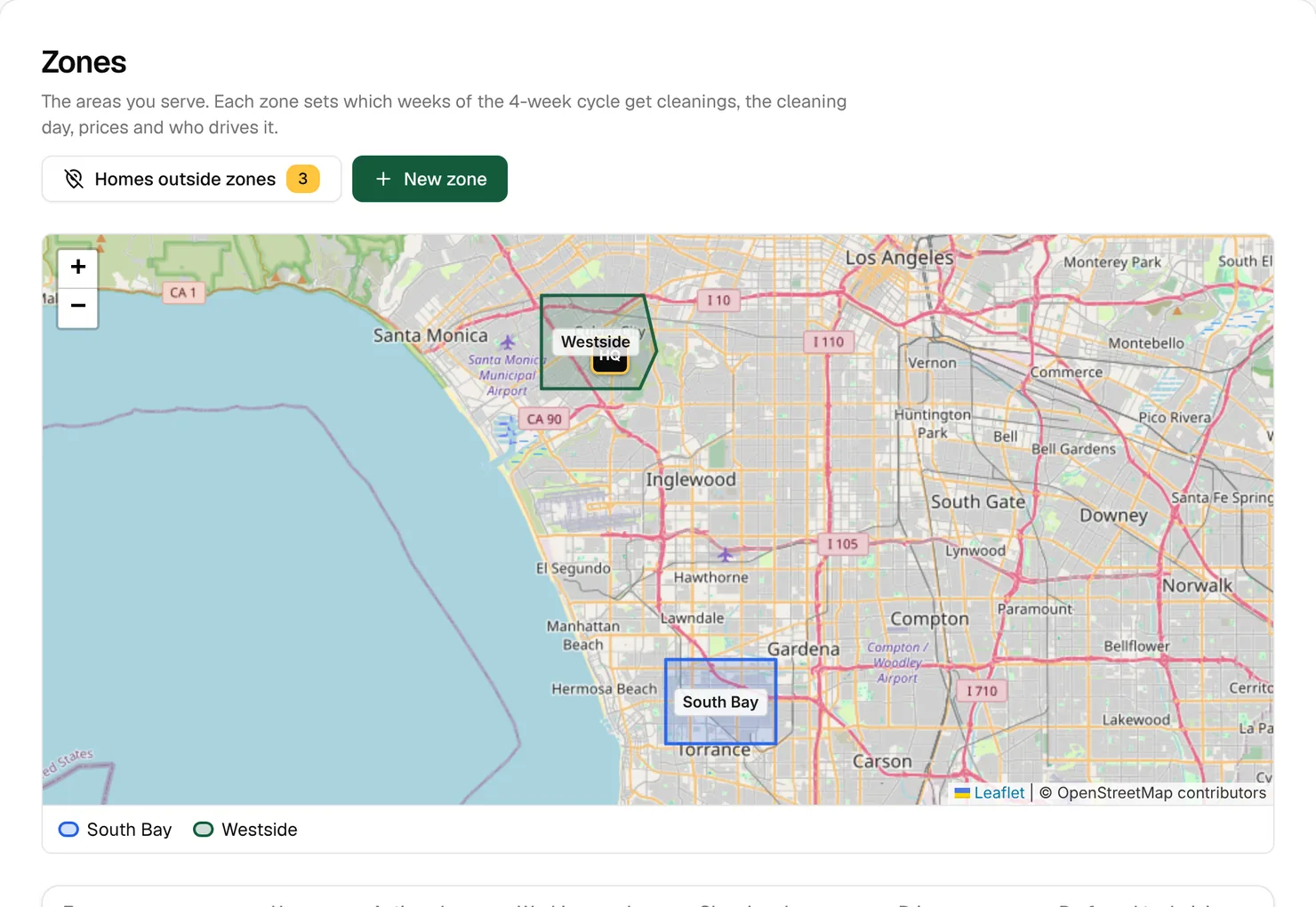
- Open Routes › Zones and click New zone.
- Click the map at each corner, at least 3. Fix mistakes with Undo last point, Remove point or Clear shape. If you already drew your area in Google My Maps, click Import KML or GeoJSON instead.
- Read the notice over the map, like “12 homes join this zone, 0 leave”, and open See the addresses to check them.
- Under Zone, fill in Name and pick a Map color. A Short code like “WS” is optional.
- Set the schedule and pricing fields below, then click Create zone.
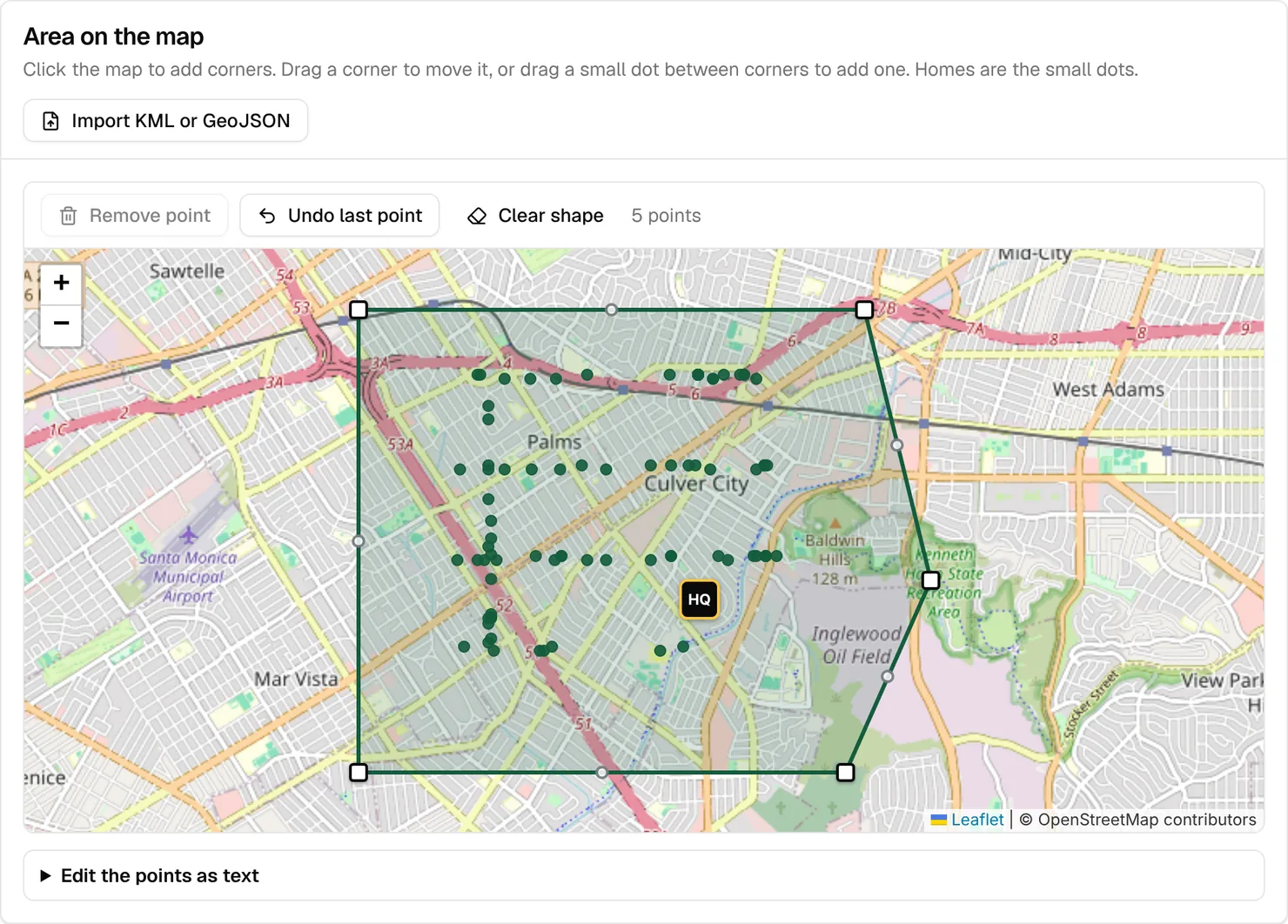
Saving puts the homes inside the shape in the zone and books any plans that were waiting for a cleaning day. Homes already in another zone stay there, and customers aren’t sent anything.
Tip: Draw small: the streets around your first customers, not the whole county. Grow the shape as they fill.
How the four-week cycle works
Cleanings repeat on a four-week cycle. Every Monday-to-Sunday week is numbered Week 1, 2, 3 or 4, then the count starts again.
- Each customer gets one week and one day. Their first cleaning places them in one week of the cycle, on their trash day, shown like “Week 2 · Tue”. Every-4-week plans come back in that week. Every-8- and every-12-week plans land in the same week, less often.
- A route group is one week plus one day in one zone, like “Week 2 · Tue”. By default it’s getting full at 16 customers and full at 30 (Business › Settings › Scheduling and routes).
- The first cleaning is at least 2 days after booking by default, never on one of your holidays or shutdowns, and for every-other-week pickup only in a week the truck comes.
The cycle keeps you in step with the truck. Many cities collect recycling every other week, and every four weeks always lands on the same pickup week, so the recycling cart is empty when you arrive.
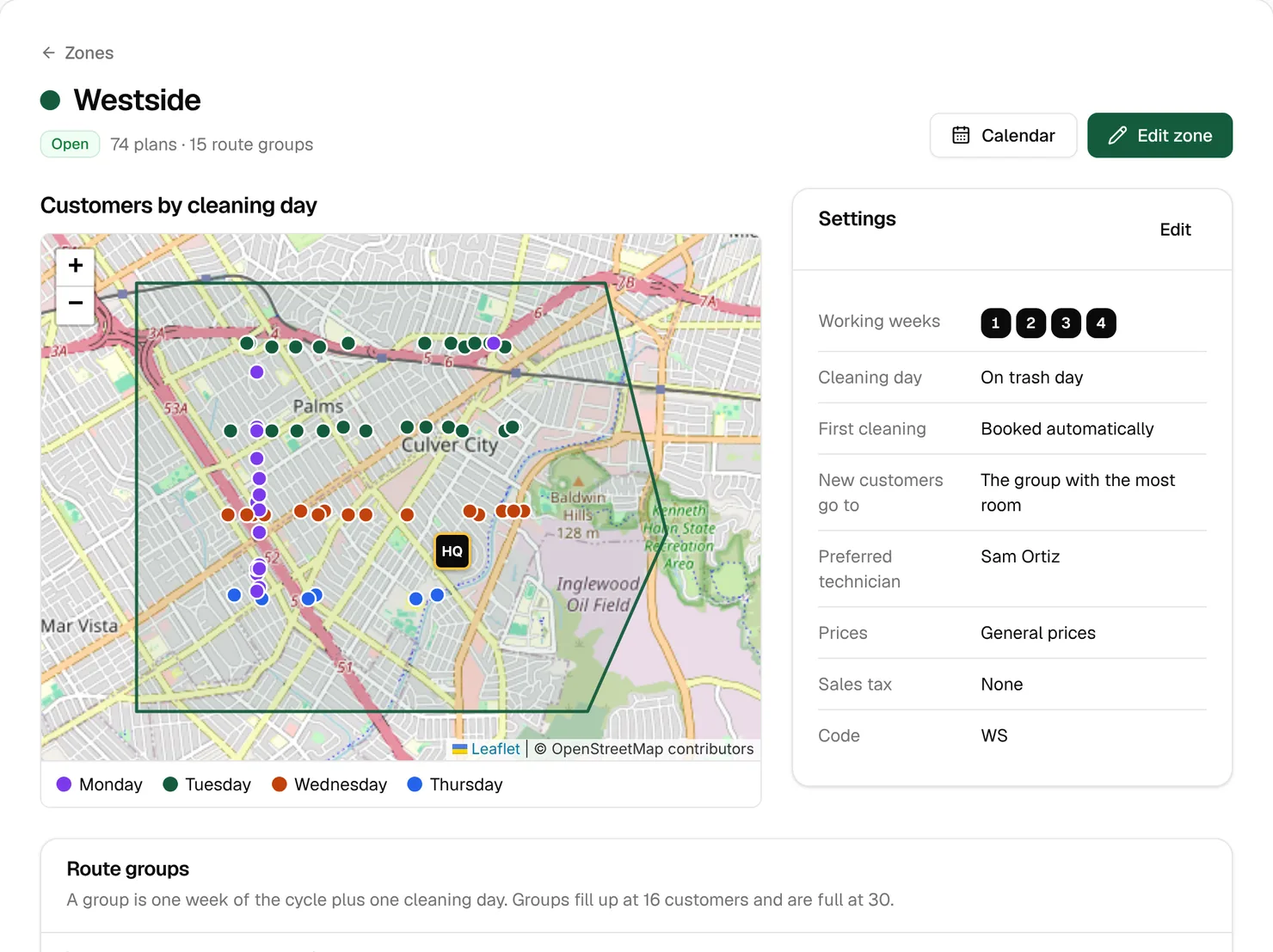
The settings on each zone
Change them later with Edit zone on the zone’s page.
- Working weeks: all four by default. Leave a week off to keep it free for another zone.
- Cleaning day: On trash day (the default, “After the truck empties the bins”) or The day after trash day (“For areas where pickup runs late”). Switching later moves upcoming cleanings a day and tells the customers.
- First cleaning booked by: Automatically, or The office if you want to pick each new customer’s first date yourself. Only online sign-ups wait for you.
- New customers go to: The group closest to them (the default) puts a new customer with their nearest neighbors. The group with the most room evens out the groups instead. Keep the default unless your groups are filling up. The Westside zone above uses most room.
- Trash hauler: homes in the zone follow this hauler’s holidays, unless a home has its own.
- Preferred technician: new cleanings go to the route group’s preferred technician, or else the zone’s. Giving a group or a whole zone to one technician clears that route’s order, so click Optimize order in Dispatch again (Lesson 8).
- Price list and Sales tax: General prices, Lower prices or Higher prices (Lesson 5), and the tax rate, 0 to 25%. Changes here only reach new sign-ups.
Example: One trailer and two zones, each with streets on Tuesday trash. Give Westside weeks 1 and 3 and South Bay weeks 2 and 4. Each Tuesday, the trailer then works one area instead of driving between both. Plans that clean every 1, 2 or 3 weeks aren’t held to working weeks.
Watch out: Taking a week off a zone doesn’t move the customers already in it. Use Rebalance at the bottom of the zone’s page to move them. They get a “Cleaning rescheduled” message with the new date.
Homes outside every zone
Some homes end up outside every zone: a door-to-door sign-up on a new street, an address that couldn’t be found on the map, or a home that fell out when you changed a zone’s shape. They get no cleaning days until they’re in one. The yellow number on Homes outside zones counts them.
- On Routes › Zones, click Homes outside zones.
- On the home’s row, pick a zone under Put in zone.
- Click Put in zone. A plan that was waiting gets its first cleaning booked.
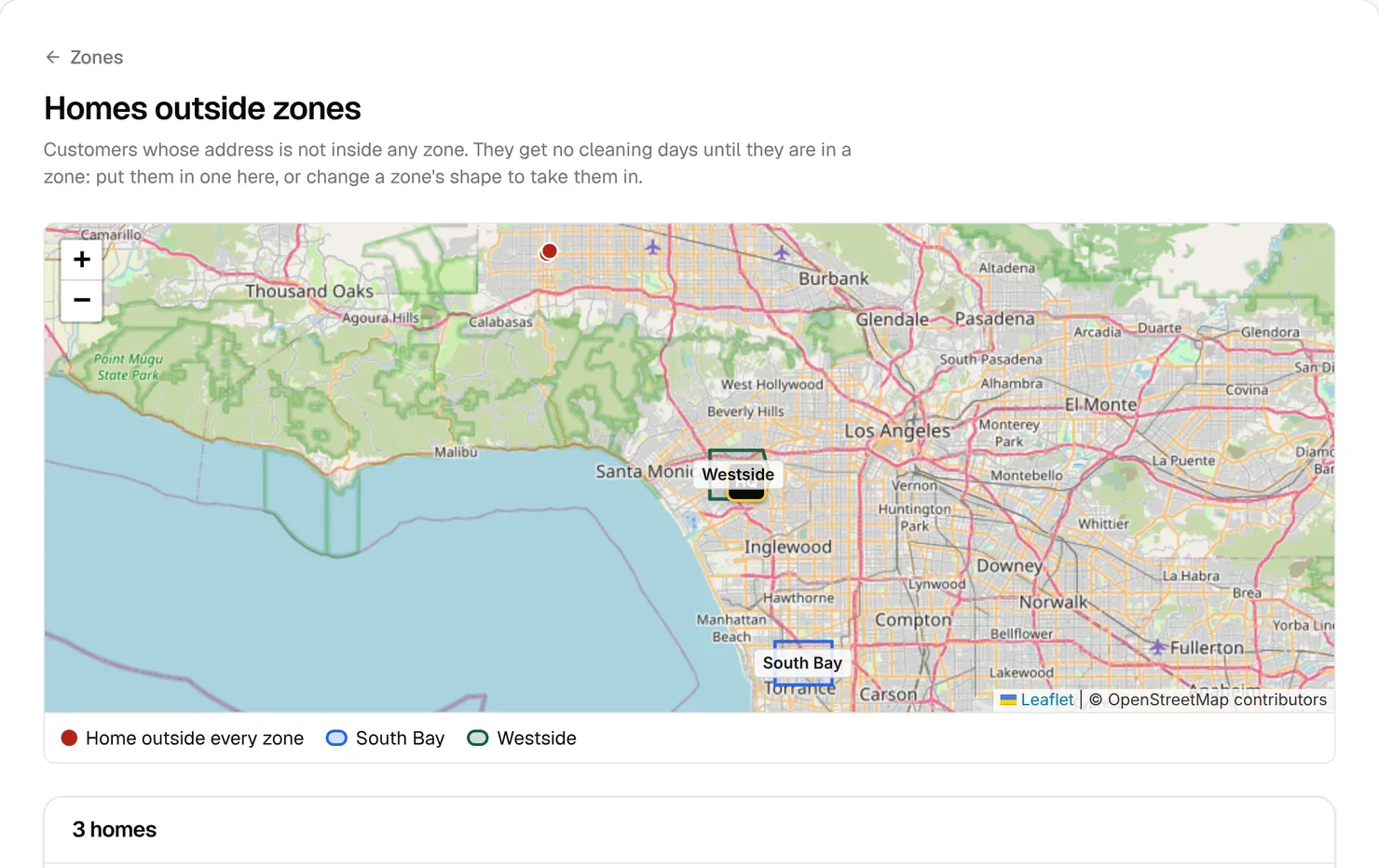
People who try to book online from outside every zone don’t land here. They get the waitlist form and show up as leads (Lesson 6).
Trash haulers and their holidays
When a hauler takes a holiday, trash day slides, and a cleaning on the usual day finds full carts. It happens often: for fall 2026, Thanksgiving changes pickup in 30 of the 50 biggest US cities. Add your haulers once, and your cleanings move with them.
- Open Routes › Trash haulers, click Add hauler, type the Name and click Add hauler.
- On the hauler’s page, under Add a holiday, set the Holiday date and Pickups move (“1 day later” is usual). Add a Name like “Thanksgiving”.
- Leave “Move cleanings already booked that week, and tell those customers the new date” ticked.
- Click Add holiday and read the What moves column.
- Choose the hauler as the Trash hauler on each zone it serves.
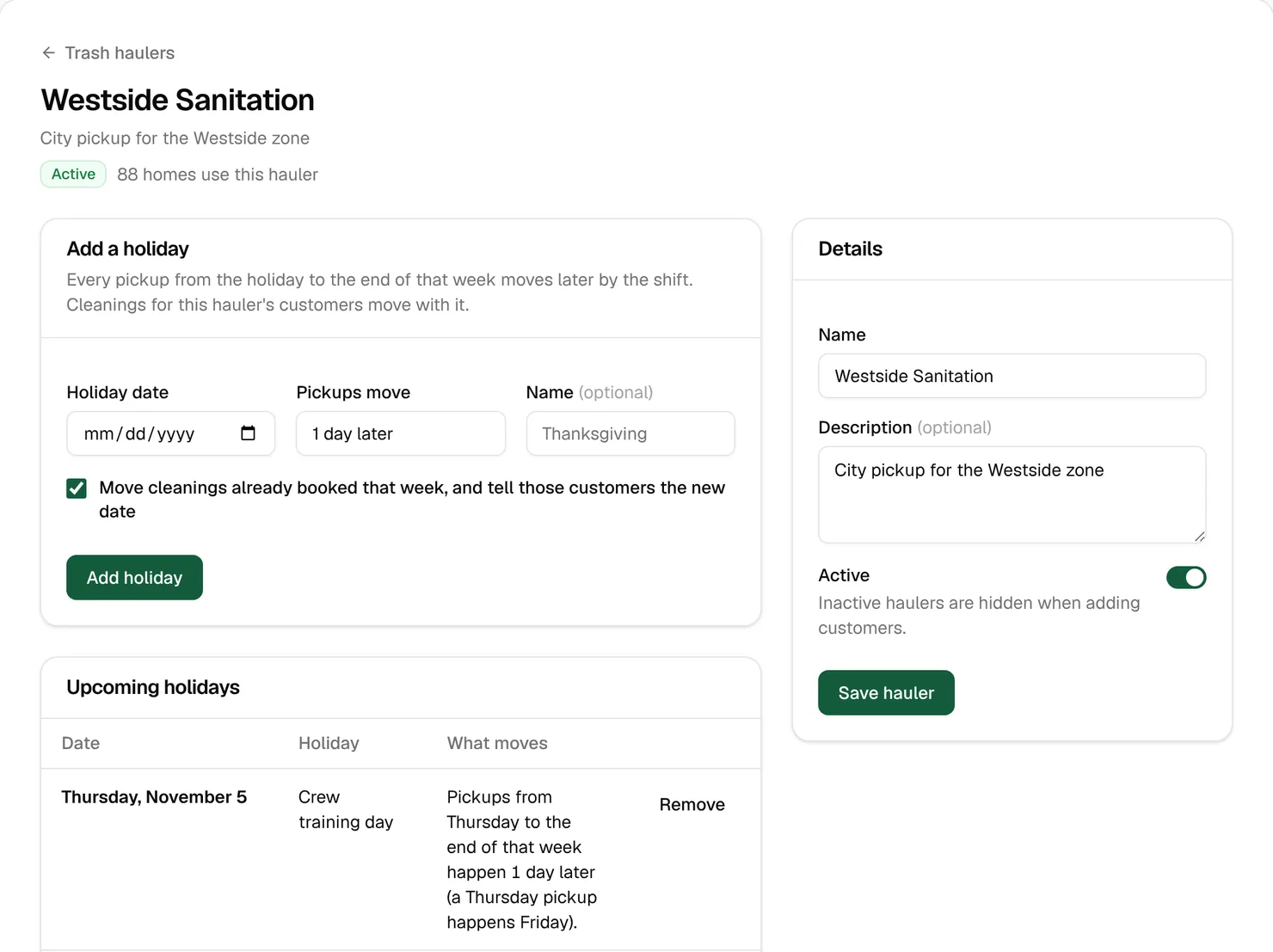
Pickups from the holiday to the end of that Monday-to-Sunday week move later, and earlier days stay put. Customers whose cleaning moved get a “Cleaning rescheduled” message, and cleanings booked later land on the moved day by themselves.
Tip: Draw each zone inside one hauler’s area. Homes take the zone’s hauler, so a zone that crosses into a second hauler’s streets moves the wrong homes on holidays. Our free trash pickup guides list who collects and the next holiday change in the 50 biggest US cities.
Your own days off
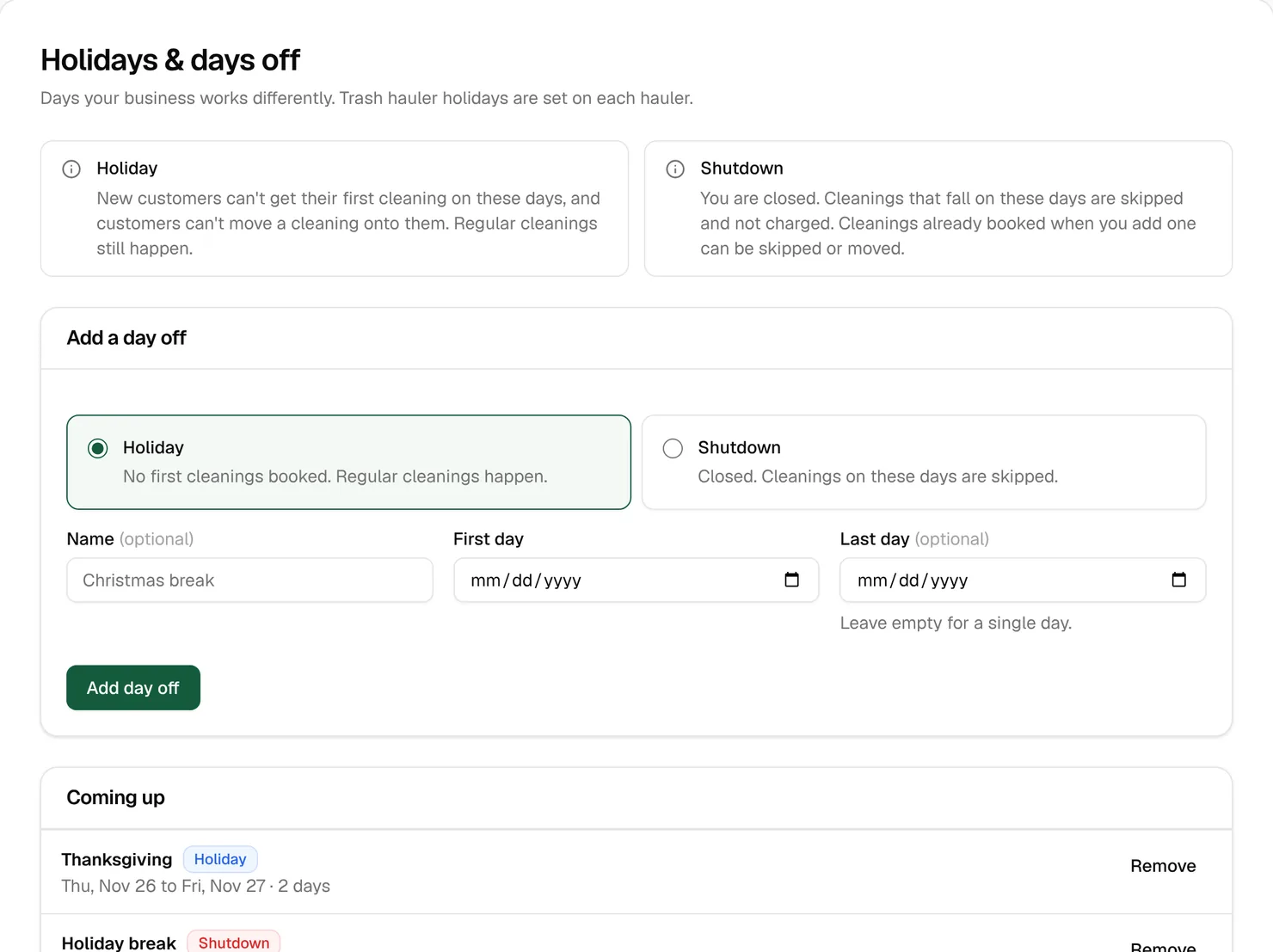
Routes › Holidays & days off has two kinds:
- Holiday: you still clean your regular customers, but nobody new gets a first cleaning that day, and customers can’t move a cleaning onto it.
- Shutdown: you’re closed. Cleanings on those days are skipped and not charged. If some are already booked, choose Skip them or move them to the first open day after the shutdown. Either way, each customer is told.
Choose the kind, add a Name, the First day and the Last day (leave it empty for one day), and click Add day off.
Watch out: One closure can be three months at most. Clean Bin Pro in Michigan, from the startup course, closes December 1 to March 31. That’s four months, so it takes two shutdowns back to back.
The Zones guide and the Trash haulers, holidays and days off guide in your Learning center cover every field.
Key takeaways
- Zones decide who can book, which week and day they’re cleaned, and what new customers pay.
- Every customer is placed in one week of a four-week cycle, on their trash day. A route group is one week plus one day in one zone.
- Keep New customers go to on The group closest to them so neighbors share a day.
- Add each trash hauler and its holidays, and set it on its zones, so cleanings slide with trash day.
- Use a holiday to stop new starts on a day, and a shutdown to close and skip the charges.
FAQ
A new customer has no cleaning days. Why?
Their home is probably outside every zone, or in a zone that’s turned off. Open Homes outside zones and put it in one. If the zone’s first cleaning is booked by the office, an online sign-up also waits for you to pick the date.
What’s the difference between a zone and a route group?
A zone is an area on the map. A route group is the customers in that zone cleaned on one weekday of one week of the cycle, like “Week 2 · Tue”.
Do I need to add trash haulers?
Only if you want cleanings to move with trash day on hauler holidays. Without a hauler, homes keep their usual cleaning day.
Can I stop new sign-ups in one area?
Yes. Turn off Zone is open in Edit zone. The sign-up page then treats those addresses as outside your area, and existing customers keep their cleanings.